
Appearance
Comparing Bookmark Managers
Quick comparison of bookmark manager apps and practical recommendations • Aug 31
Overview
Managing bookmarks effectively is crucial for organizing your digital resources. After building a directory of categorized links, you need software that makes searching, tagging, and organization seamless. This guide compares the most popular options.
Available Options
🔍 Google Chrome
Built-in bookmark manager accessible at chrome://bookmarks (Ctrl+Shift+O)
Features:
- Save links with name and URL
- Create nested folders and subfolders
- Search across folders, links, and names
- Display folder location for each bookmark
- Sort bookmarks by name
- Import/export as HTML
🦊 Mozilla Firefox
Native bookmark manager accessible with Ctrl+Shift+O
Features:
- Save links with name, URL, tags, and keywords
- Create nested folders and subfolders
- Advanced sorting (name, tag, location, visit count, date added, modified, A–Z, Z–A)
- Search bookmarks by name and URL (not across folders)
- Import/export as HTML
- Backup/restore as JSON
- Restore previous versions from backup history
☁️ Raindrop.io
Online-first bookmark management platform with polished UX
Features:
- Search across folders, tags, and bookmarks
- Web-based with cloud synchronization
- Rich tagging system
- Folder organization
- Cross-device availability
- Premium features available
Feature Comparison
| Icon | App | Storage | Search Folders | Local Storage | Tags | Filters (Tags + Metadata) | Collaboration | Public Pages | Export | Sync |
|---|---|---|---|---|---|---|---|---|---|---|
 | Google Chrome | Local | ✅ | ✅ | ❌ | ❌ | ❌ | ❌ | HTML | ⚠️ |
 | Mozilla Firefox | Local | ❌ | ✅ | ✅ | ✅ | ❌ | ❌ | HTML, JSON | ⚠️ |
| Raindrop.io | Cloud | ✅ | ❌ | ✅ | ✅ | ✅ | ✅ | HTML, CSV | ✅ | |
 | Linkwarden | Cloud | ✅ | ❌ | ✅ | ✅ | ✅ | ✅ | HTML | ✅ |
Visual Analysis
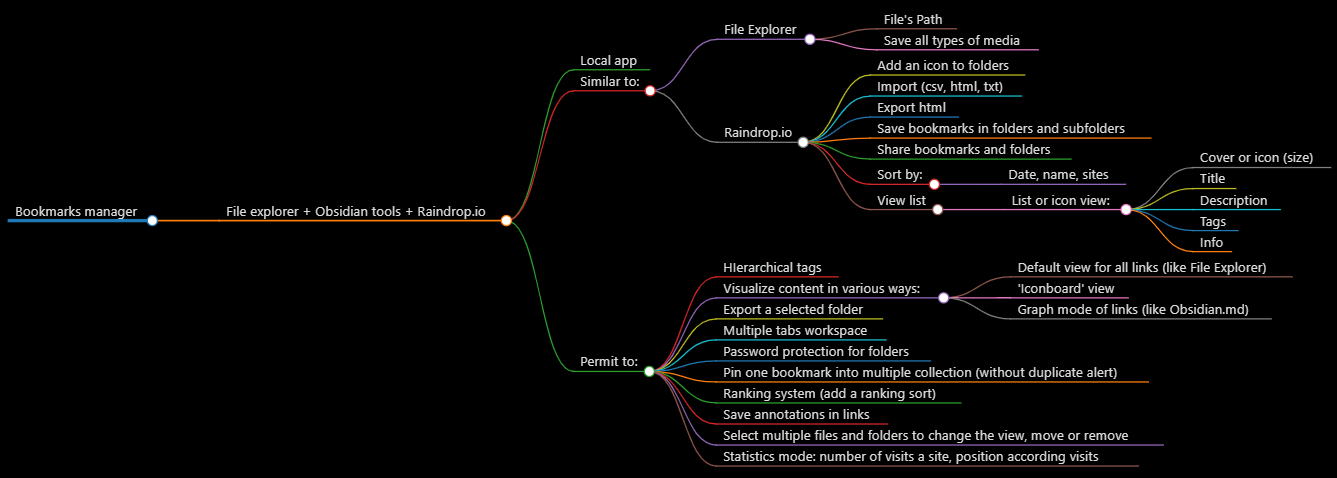
Recommendations
🚀 Best for quick setup: Use Raindrop.io if you want:
- Fastest onboarding with polished interface
- Cloud synchronization across devices
- Powerful tagging and organization
- Web-based access anywhere
🔒 Best for data control: Use Firefox Bookmarks if you need:
- Full local storage without external servers
- Backup and restore capabilities
- No monthly subscriptions
- Complete data ownership
💼 Best for developers: Use Linkwarden (self-hosted) if you want:
- Self-hosting and data control
- Web snapshots and archives
- Open-source flexibility
- Complete data privacy
Bottom Line
Start with your browser's built-in bookmarks for basic organization. Graduate to Raindrop.io when you need cross-device sync and better search. Consider Linkwarden if self-hosting and data ownership are priorities.