
Appearance
Comparing Bookmark Managers
Quick comparison of bookmark manager apps and practical recommendations • Aug 31
After getting a directory of categorized links you need software that makes search, tagging, and structure effortless. Below is a quick comparison of mainstream options and two recommendations that cover most needs.
With Google Chrome you can use the bookmark manager with chrome://bookmarks or the shortcut Ctr+Shift+O. The app permit to:
- save links with name and url
- create folders and sub-folders
- search folders, links and names
- option to show the folder of a link and
- sort links by name
- import / export links as an HTML
With Mozilla Firefox you can use the bookmark manager with the shortcut Ctr+Shift+O. The app permit to:
- save links with name, url, tag and keyword
- create folders and sub-folders
- sort by name, tag, location, most recent visit, visit count, added, last modified, A > Z, Z > A
- search name links and urls, not with folders
- import / export links as an HTML
- backup as json
- restore links from previous days
With raindrop.io app you can search for folders, tags and links. It's the best bookmark manager but only works online.
| App | Chrome | Firefox | Raindrop.io |
|---|---|---|---|
| Graph of bookmarks | --- | --- | --- |
| Local / Online | Local | Local | Online |
| Search folders | YES | NO | YES |
| Stored in local | YES | YES | NO |
| Tags | NO | YES | YES |
Here is a mind map of the best tool to create a bookmark manager.
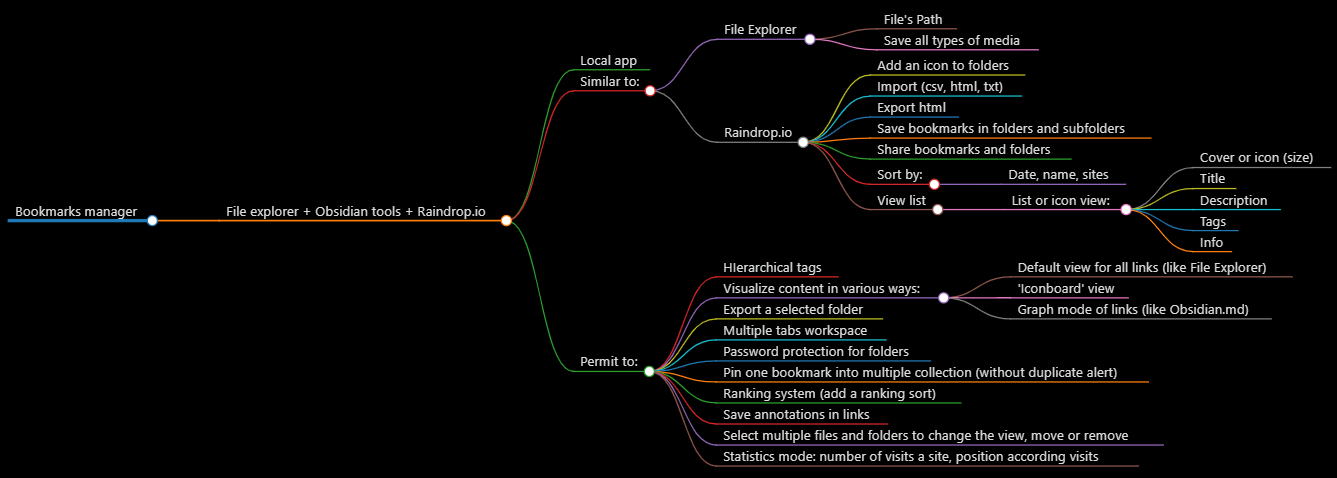
Takeaways:
- Start with Raindrop.io if you want the fastest setup and polished experience.
- Choose Linkwarden if you need self-hosting, snapshots, or tighter control of your data.